The whole set of notes
You already have the photos: drop 50 at once and get a ZIP with all of them converted and numbered in reading order.
Upload the PDF and download the screens, ready to copy across. No screenshots, no cropping, no converting one by one: that is what it saves you, and it actually reads because it is laid out for 384×192.
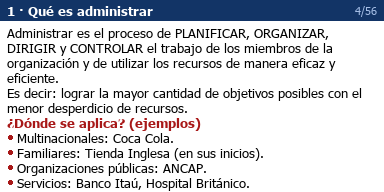
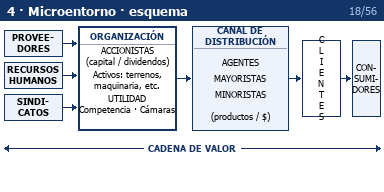
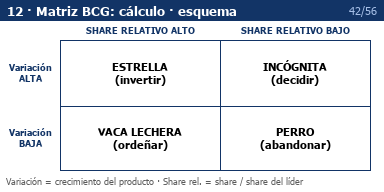
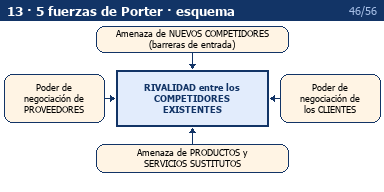
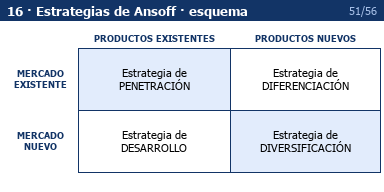
Real screens from the Principles of Management summary that started this: 56 of them, built from a 10-page PDF.
An 80-page summary means 200 screenshots taken by hand, one at a time, and then converting them one by one.
2 h +
by hand, screenshot by screenshot
2 min
upload the PDF, download the ZIP
Your PDF · 10 pages
56 readable screens
Drop your PDF here
A summary, class notes or a formula sheet. Every 25 pages count as one document, and we tell you before it is spent.
This mode needs an account first.
Hand it the whole document and it comes back laid out in screens: headings, bullets and formulas that fit without breaking. No screenshots, no cropping, no numbering by hand.
You already have the photos: drop 50 at once and get a ZIP with all of them converted and numbered in reading order.
Set the crop, contrast and background, then download the .g3p. No account, no limit: a photo of the board or a diagram, whenever you want.
Three steps, once. After that it is drag and drop.
Over USB, then pick “USB Flash” on the on-screen menu. It mounts as a removable drive.
Straight onto the drive, no subfolders: Picture Plot only reads the root of the storage memory.
MENU → Picture Plot → F1 (Open). Pick the file and your notes are there.
Converting a single image is free forever. For US$ 7 you unlock bulk conversion for life and get three documents processed by the AI. Signing up gives you one to try it.
See the pricesRight now CalcNotes only works with Casio Prizm models, the ones that use the .g3p format. Tell us what you have and we will let you know if we add it: we pick the next one from what people ask for, not from a hunch.
The full screen is 384×216, but the image area of the .g3p format is 384×192: the missing 24 pixels are the system status bar. Working at 192 avoids any rescaling and keeps the text sharp pixel for pixel.
Converting one image at a time is free, with no account and no limit. You pay for work done in bulk: batch conversion, which unlocks once and stays unlocked, and each document the AI processes.
Not yet, and the reason is technical: background images on the TI-84 Plus CE are 83×133 pixels, less than a tenth of what a Prizm holds. At that size a summary is unreadable. If you have one, ask for it below and we will let you know if we find a way.
No. The bulk pass stays unlocked for good and the AI documents are spent whenever you like. They are charged when the summary is generated, which is when the document is processed, and it then stays in your library to download as often as you need at no extra cost.
Images are converted entirely in your browser: they never leave your computer. Only the PDF in AI mode reaches the server so the model can read it, and it is not stored once the screens are generated.